Pages

Showing posts with label interest calculation. Show all posts

Tuesday, February 28, 2017

Advanced Interest Calculation in Tally ERP 9

In the Ledger Based Interest Calculation we computed interest on the entire ledgers without identifying any specific transaction. but often we have to compute interest for each transaction.

Let us see the following transactions..
  1. 01-04-2016 > Loan amount given to Nithish Rs.30000 with Interest 10% per year (with due date/Credit Days 90 Days - Loan Ref No : Loan-001)
  2. 01-05-2016 > Another Loan amount  given to Nithish Rs.50000 with Interest 10% per year (with due date/Credit Days 60 Days -  Loan Ref No : Loan-002))
  3. 01-06-2016> Loan amount Rs.20000 received from Nithish against ref No : Loan-001
  4. Calculate the interest as on Date 01-07-2016 for Nithish A/c
To Make Above Transactions pls follow the steps with golden Keys of tally

1.Accounting Features :

Gateway of Tally 9 >  Press F11 > Accounting Features > Maintain Bill Wise Details > Yes and Activate Interest Calculation : Yes

2.Masters :

Gateway of Tally 9 > Accounts Info > Ledger > Single : Create 
Name of Ledger : Loan to Nithish  > Under: Loans & Advances (Asset) > Maintain Balance Bill by bill : Yes (For Non Trading A/c Also : Yes) > Activate Interest Calculation : Yes (Use Advanced Parameters : No) > 

Calculate Interest Transaction - By  - Transaction : Yes
Override Parameters for Each Transaction : No
Rate : 10% per Calander Year

3.Vouchers :

01-04-2016 > Loan amount given to Nithish Rs.30000 with Interest 10% per year (with due date/Credit Days 90 Days - Loan Ref No : Loan-001)

Gateway of Tally 9 > Accounts Vouchers  > Press F5 for Payment Voucher > Make Sure Date is 01-04-2016 (Press F2 Change Date)

Payment 
A/c : Canara Bank
Particulars - Amount
Loan to Nithish          30000 
Bill Wise Details :
New Ref  - Loan-001 - 90 Days -30000 Dr.
Accept : Yes

01-05-2016 > Another Loan amount  given to Nithish Rs.50000 with Interest 10% per year (with due date/Credit Days 60 Days -  Loan Ref No : Loan-002)

In Another Payment Voucher : Make Sure Date is 01-05-2016 (Press F2 Change Date) 

Payment 
A/c : Canara Bank
Particulars - Amount
Loan to Nithish          50000
Bill Wise Details :

New Ref  - Loan-002 - 60 Days -50000 Dr.
Press CTRL + A (or) Accept : Yes


01-06-2016> Loan amount Rs.20000 received from Nithish against ref No : Loan-001

In Press F6 Receipt Voucher : Make Sure Date is 01-06-2016 (Press F2 Change Date) 


Receipt
A/c : Canara Bank
Particulars - Amount
Loan to Nithish          20000
Bill Wise Details :
Agst Ref  - Loan-001 - 1-Apr-2016 - 20000 Dr.
Press CTRL + A (or) Accept : Yes

4.Reports :

Calculate the interest as on Date 01-07-2016 for Nithish A/c

Gateway of Tally > Display > Statements of Accounts > Interest Calculation > Ledger > Loan to Nithish  > Press F2> 01-04-2016 to 01-07-2016 > You Can See the Report 

Monday, December 12, 2016

Interest Calculation - ( Ledger Based Interest)


Make the following voucher entries :
01-04-2016 : Loan amount Rs.10000 given to rahul with interest 10% per year
01-05-2016: Loan amount Rs.15000 again given to rahul with interest 10% per year
01-06-2016: Loan amount Received Rs.10000 from rahul
01-07-2016: Loan amount Received Rs.5000 from rahul

Steps :
1.Features Setting : Before You Make Interest Calculation in Tally9 Pls Check Follows:

  • In Gateway of Tally > Press F11 (Company Features) > Accounting Features > Activate Interest Calculation : Yes (Use Advance Parameters : No)
  • In Gateway of Tally > Press F12 (Configuration) > Accts/Inventory Info > Allow Advanced Entries in Masters :Yes.
  • In Gateway of Tally > Press F12 (Configuration) > Voucher Entry > Use Single Entry Mode for Pymt/Rcpt/Contra : Yes.
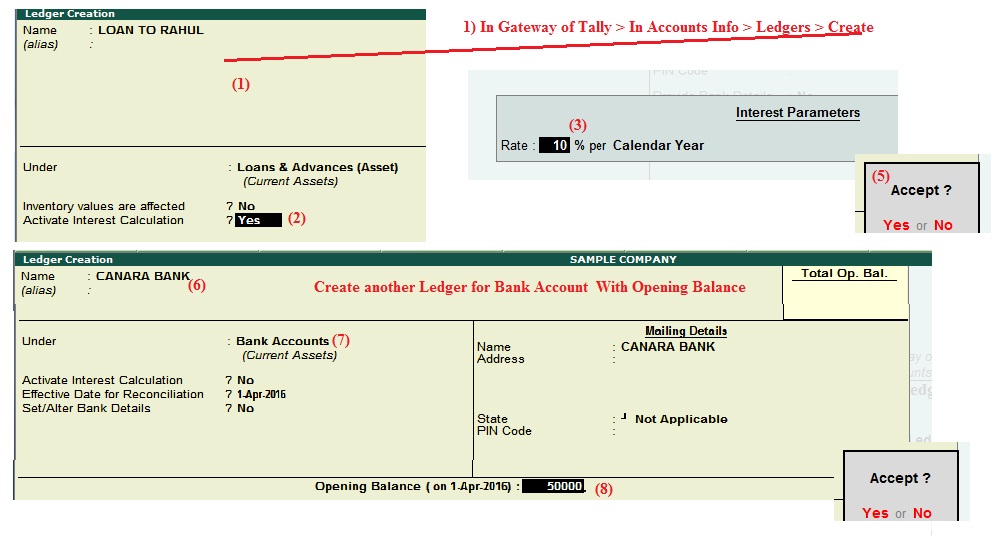
    2. Master Entry : Create the Following Ledgers for Example..

    In Gateway of Tally > In Accounts Info > Ledgers > Create

    1) Name : Loan to Rahul--------- Under : Loans and Advances (Asset)
    Activate Interest Calculation : Yes.
    Rate 10 % Per Calender Year. 

    2) Name : Central Bank of India Under : Bank Accounts , Opening Balance :Rs.50000

    3. Voucher Entry :

    01-04-2016 : Loan amount Rs.10000 given to rahul with interest 10% per year

    Gateway of tally 9 > Accounting Voucher > Press F5 ( Payment Voucher ) > Press F2 : 01-04-2016 > 

    Account : Central Bank of India   > 
    Particulars: Loan to Rahul  ----  Rs.10000 >
    (Note : Press Enter to again and again upto Accept yes  or Press CTRL + A to Accept Immediatly)

    01-05-2016: Loan amount Rs.15000 again given to rahul with interest 10% per year

    In Same Payment Voucher(F5) >  Press F2 : 02-05-2016 (Change the Date) >

    Account : Central Bank of India >
    Particulars: Loan to Raju ---- Rs.15000 > (After  entering amount rs.15000 Press CTRL + A to Accept Immediatly)

    01-06-2016: Loan amount Received Rs.10000 from rahul

    Press F6 ( Receipt Voucher ) > Press F2 : 01-06-2016 >

    Account : Central Bank of India >
    Particulars: Loan to Rahul---- Rs.10000 >

    01-07-2016: Loan amount Received Rs.5000 from rahul

    Press F6 ( Receipt Voucher ) > Press F2 : 01-07-2016 >

    Account : Central Bank of India >
    Particulars: Loan to Rahul---- Rs.5000>

    So Over all Rs.25000 given to rahul and Rs.15000 received from rahul . so how calculate the interest :

    4.Reports :

    • In Gateway of Tally > Display > Statements of Accounts > Interest Calculation >Ledger> Select : Loan To Raju >
    • Press F2 Change Period > From : 01-04-2016 To : 01-05-2016 > You can see the report
    10000 – 1-apr-2016 – 1-may-2016 – 30 Days – 10 % – 82.19 Dr
    Again Change F2 > From : 01-04-2016 To : 01-06-2016 > Now..
    10000 – 1-apr-2016 – 2-may-2016 – 31 Days – 10 % – 84.93 Dr            
    25000 – 2-may-2016 – 1-june-2016 – 30 Days – 10 % – 205.48 Dr
    (10000+ 5000=25000)
    Again Change F2 > From : 01-04-2016 To : 01-08-2016 > Now..
    Again Change F2 > From : 01-04-2016 To : 01-03-2017 > Now..
    (Every time  10% Calculated based on ledger interest )
    5.Screen Shots :
    5.1 Features and Configuration Settings :

     5.2 Ledger Creation


     5.3 Voucher Creation

     5.4 Reporting Section


    Thanks


    Tuesday, March 15, 2016

    Interest Calculation in Tally9 (Simple Mode)

    Interest Calculation in Tally9 (Simple Mode)

    1.Features Setting : Before You Make Interest Calculation in Tally9 Pls Check Follows:

    • In Gateway of Tally >  Press F11 (Company Features) > Accounting Features > Activate Interest Calculation : Yes (Use Advance Parameters : No)
    • In Gateway of Tally >  Press F12 (Configuration) > Accts/Inventory Info > Allow Advanced Entries in Masters :Yes.
    • In Gateway of Tally >  Press F12 (Configuration) > Voucher Entry > Use Single Entry Mode for Pymt/Rcpt/Contra : Yes.
    2. Master Entry : Create the Following Ledgers for Example..


    • In Gateway of Tally  > In Accounts Info > Ledgers > Create 
             1)  Name : Loan to Raju  --------- Under : Indirect Incomes 
                  Activate Interest Calculation : Yes.
                  Rate 10 % Per Calender Year.
             2)  Name : Bank of Baroda Under : Bank Accounts , Opening Balance :Rs.12000

    3. Voucher Entry : Paid Rs.10000 to  Raju with Interest 10% - 
    • In Accounting Voucher  > Press F5 ( Payment Voucher )  >

           1) Account  : Bank Of Baroda   
               Particulars:
               Loan to Raju ------------------------------------ Rs.10000
                                                                             ---Accept : Yes  
    4.Reports :

    • In Gateway of Tally >  Display > Statements of Accounts > Interest Calculation > Select : Loan To Raju > You Can See Blank Page >
    • Press F2 Change Period > From : 01-04-2015  To : 01-04-2016 > Now You Can See the Interest  Amount Rs.1000 for Loan Amount Rs.10000
    • Again Change F2 > From : 01-04-2015  To : 01-05-2015 > Now You Can See the Interest  Amount Rs.81.97  for (30 Days Only) 

    Wait for Updation.............